Showing posts with label Internet. Show all posts

Tuesday, 31 July 2012

10 Essential Google Chrome Extensions

The new extensions and features introduced to Apple’s premium browser Safari, following last week’s release of Mountain Lion, may have been a long time coming.

But many of us who use Mozilla Firefox, Internet Explorer or Google Chrome will already have become accustomed to the world of browser extensions for our every day use.

Extensions have almost become a necessity, enhancing your web surfing experience. Firefox, Explorer, Chrome and now Safari all possess incredible functionality in the form of add-ons, which you can install within seconds.

The best browser extensions are those that feel like built-in features, so we decided to select the 10 best for essential web browsing to make using Chrome even more enjoyable:

Awesome Screenshot


The ability to take screenshots of the web page you’re looking at is always useful. Awesome screenshot takes that process one step further by giving you more options. Select a selection or the whole page. Once captured, you also have the option to crop the image, make annotations, plus more. Images can be saved locally or copied to the clipboard.

➤ Awesome Screenshot

Clipper by Clipboard


 Save anything online with Clipboards very own Clipper extension for Chrome, and we mean anything! HTML, text, images even flash applications are easily clipped, annotated and tagged and then saved to your Clipboard gallery within seconds. All clips can be viewed in your Clipboard profile, which you can then publish or keep private, should you wish to do so.

➤ Clipper
Chrome to Phone


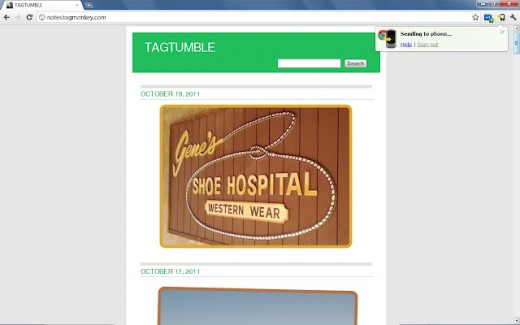
Android user? Excellent. Install the Chrome to Phone app to your phone and launch the Chrome to Phone extension icon on your browser. In a matter of seconds you’ll be able to push web links, maps and phone numbers to your Android device and open them up when you’re out and about. A must have extensions for all Android users.

➤ Chrome to Phone

RadioPlayer


For UK audiophiles only, Radioplayer is an online radio player giving you access to radio stations from across the UK and Northern Ireland, the Isle of Man and the Channel Islands. With up to 320 stations, listen and rock to your favorite music, podcasts and shows straight from your browser. No additional software needed, you can store your favourite channels and set presets, which will automatically launch for the next time you tune in. 

➤ RadioPlayer

Send from Gmail


You’ll find numerous Gmail extensions on the Chrome Web store – some good, some not so good. Send from Gmail falls in the former. Unlike other extensions, Send from Gmail will enable you to compose an email right from the extensions bar. It provides a button that will create a Gmail message when clicked, using the page title as the subject and selected page text and link address as the message. Handy.

➤ Send from Gmail

Download Master


You’re at a website and you want to downlaod more than one file? Well now you can with Download Master. With a single click, the Download Master extension gives you the option to see what links are available, enabling you to pick and choose of what you want to download. Once selected, leave the rest to Google, who take care of all downloads with its built-in manager.

➤ Download Master

Google Dictionary


Google’s Dictionary extension is a joy to use. Quick, easy and effective, it does the difficult things with ease. Double-click any word to view its definition in a small pop-up bubble. Or if you like, view the complete definition of any word or phrase using the toolbar dictionary. Foreign languages are also catered for making this an must have extension on your browser. You’d be lost without it.

➤ Google Dictionary

Rapportive


The appeal of Rapportive is very easy to see. An intuitive Gmail extension that enables you to create a cool social profile of any individual whose email address you enter, by pulling all the social feeds from the web. A really smart and clever add-on to enhance your Gmail experience.

➤ Rapportive

AddThis


Sharing online content to your numerous social channels can be a bit of a chore. This is where Add This lends a helping hand.
AddThis allows you to instantly share content on Facebook and Twitter as well as many other services. You can bookmark, print, or even translate pages as well. Options to customize and personalize your list of services are a plenty. Choose Options and you’re good to go.

➤ AddThis

Pocket (Formerly Read it later)


Don’t have time to read your favourite blog, match report or film review? Save it to Pocket instead and read it later. Pocket automatically syncs to your phone, tablet or computer so you can view your saved page at any time, even without an internet connection. Containing integrated buttons on Twitter.com and Google Reader for one-click saving, Pocket is an essential tool for your everday online reading.
➤ Pocket

Stylish


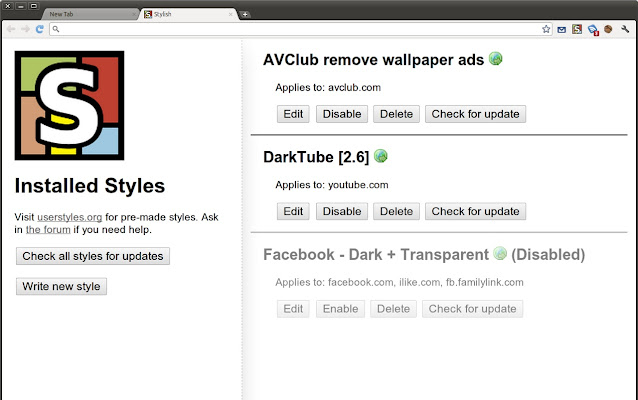
An unknown gem, Stylish restyles your web pages with the help of a user styles manager. Install new skins and themes for your favourite sites and take out irrelevant content. Change colors and completely redesign an entire site. Want to remove ads from Facebook or change the color of your Twitter page? Use Stylish to do this plus a whole lot more.

➤ Stylish

If there are any extensions you feel that should have made the list, do let us know by leaving a comment.

Sunday, 29 July 2012

How to get a free Domain Name

First of all let me say it's almost impossible to buy a domain name for free, but there is a way through which you can buy domain names without loosing money from your pocket directly. And that's explained below. Just Move forward and get a free domain name.

Step 1: Signing into Cashle.com

Cashle is just a Site through which you can earn cash and by which you can shop products and coupons right around. What you have to do is just move on to www.cashle.com and register an account their with your details.

Step 2: Earning Cash at Cashle.com

Cashle is giving you many ways to earn cash like watching ads, completing surveys, playing games, referring friends, etc. Using any suitable ways you just have to increase your cash so as you can buy a domain from GoDaddy.Com


Step 3: Creating an account on GoDaddy.Com

You all may have heard about Godaddy.Com. And you just have to move on to GoDaddy.Com and register an account with your correct details.

Step 4: Getting Coupon from Cashle.com

1) Move your pointer towards the "GET PAID" option on the top and click on the "Withdraw Earnings" option on the drop down list.  


2) Move down to the "Go Daddy Gift Certificate", enter the amount and withdraw and you will get the coupon right there.


Step 5: Using Coupon at GoDaddy.Com

Just log in to the account you have created earlier and just use the coupon code right there and enjoy the free purchase!

Hope you have understood it well if you have any doubts relating to this or whatever you can comment below!

Thursday, 26 July 2012

What is Chitika PPC(Pay-per-click) program? Is Chitika affiliate PPC program better than Google adsense?

Many of you may be well aware of Google adsense affiliate program which is the market-leader in PPC(pay-per-click) affiliate marketing. However, many of you may not be aware of "Chitika" PPC affiliate program which is closely following Google adsense. Google AdSense and Chitika are the current two top players in the PPC advertising market.
Started in 2003, Chitika (pronounced as CHIH-tih-ka), is a full-service on-line advertising network serving over 2 billion monthly impressions across more than 30,000 websites.Chitika has been named one of the leading private technology companies in North America by Red Herring. It is also one of the top 100 private companies in North east.
In the last few years, Chitika has been growing incredibly as a popular PPC program around the globe due to its overall features, and affiiate- friendliness. Several people are making thousands of dollars through the Chitika affiliate program.


Chitika is currently Google adsense's close rival, and their pay per click rate has been considerably higher than that of Google Adsense. Further, their eMiniMall ads are different from Google AdSense text ads in a number of ways.

1.Chitika eMinimall ads contain product pictures and hence, they can target specific products.
2.Visitors can search for competitive products on your website without leaving the page.
3.Publishers have the option to control the context sensitive keywords.
4.Unlike Google adsense, new pages with low click-thru rates (CTR) are not penalized.
5. Chitika has a Chitika affiliate program for publishers to recruit new members.
Chitika ads can run on the same page as Google adsense.
Another significant way of earning money through Chitika is their referral program, through you’ll get 10% of what your referral gets. Chitika outperforms Google Adsense in some cases. The CTR(click-through-rate) is also outstanding . Chitika will make payment 30 days following the end of the month provided that your total revenue has exceeded $10 (for PayPal).
However, Chitika does have a significant disadvantage. Since Chitika ads look much more like actual advertisements than AdSense ads, the CTR of Chitika eMiniMalls is considerably lower when compared with AdSense.
Chitika ads are a wonderful source of income if you are planning to implement them newly on your webpages, or maximize your revenue in addition to Google Adsense.

Wednesday, 25 July 2012

15 Things White Girls Love To Do on Facebook

1. Take pictures of their feet.

 This is what our feet look like!

2. Express their extreme annoyance at this work day today and hint that it deserves a much needed alcoholic beverage at the end of it. WINK WINK.

3. Thank their hubby for being the best hubby in the world while their hubby is sitting right next to them.

4. Complain about bad service at restaurants. “Never eating at Applebee’s AGAIN!”

5. Express their extreme excitement to see their best friends tonight, Brintney, Whitney, and Sarah!!! Love YOU GIRLS!!

6. Take pictures wearing a lot of makeup and looking really preppy while simultaneously making a “hard” facial expression and holding up what they consider to be a gangster sign. Potential caption: ‘Straight thuggin.’

We're hard!!!

7. Take pictures of undeserving food.

 I effing love oatmeal!!! Mmmmmmm.

8. Make their status the song lyrics of any Kings of Leon Song.

9. Take a picture of someone they deem inferior to themselves in some way with the question: Really?

10. Write angry letters to companies (Dear EZ PARK, I hate you!), unorganized groups of people (Dear slutty freshmen who think that leggings can be worn as pants..), and non-entities (Dear unseasonably cold weather, WTF?!)

11. Subtly yell at no one in particular while being very specific. “Wow, it’s hard to believe that you think you know someone and then they turn around and STAB YOU IN THE BACK. Will never make that mistake again. EVER.”

12. Document exceedingly mundane activites for the day. “Getting my oil changed today. Then getting much needed groceries. Then it’s off to the post office to mail some bills. Then stopping by the gyno. Will probably need some gas by the end, so I may stop at the gas station. But I might be tired so I’ll probably just get it in the morning on my way to pick up a prescription. But if I’m not very tired I’ll probably just get the gas on the way home. Again, unless I am tired.”

13. Express their distaste for facebook on facebook and threaten to leave facebook to their facebook friends.

14. Ask seemingly rhetorical questions. “It’s cool to do a bunch of meth and babysit 20 six year olds, right?”


15. Write a status in another language. Parce que, Je suis tres intelligente!!


Tuesday, 24 July 2012

Google Builds Largest Database of Links to Pirated Media

By indexing all copyright takedown requests online, Google is rapidly building the world’s largest database of links to pirated content. Just last week, a record-breaking 719,415 new URLs were added to the takedown database. Copyright holders are responding to this effort with a comical display of meta-censorship, in which Google is asked to remove links to takedown requests, because these link to sites that link to copyrighted material.


Under the DMCA copyright holders have the right to demand that websites disable access to infringing content. Without doubt, one of the top recipients of these notices is Google.
To give the public insight into the scope and nature of this process, Google started to publish all takedown requests online as part of their transparency report. Since then, the number of URLs Google is being asked to remove has grown rapidly.

Last week Google received takedown requests for a record-breaking 719,415 URLs, which is double the amount that were sent in two months ago, and four times as many as in January of this year. Google’s data further reveals that Microsoft and the RIAA are the most active senders.

URLs in takedown requests per week

For the copyright holders the purpose of these takedown requests is to make pirated content unavailable through Google’s search engine. This happens through automatic takedown tools, with the unfortunate consequence that legitimate movie trailers and IMDB or Last.fm pages are censored too.

But, there is another issue that casts doubt over the effectiveness of the process.

Because Google indexes all takedown requests with the “infringing” URLs on the ChillingEffects website, the search engine is effectively building the world’s largest database of links to pirated content.

Around the same time next year, Google will have built a database of dozens of millions of pirated links, and a few years later it will be a billion links. Not just links to BitTorrent sites, but also files hosted on cyberlockers, blogs and a wide range of other websites all collected in one place.

Of course, Google’s search engine already indexes pretty much the entire Internet, but a database dedicated to infringing content opens up the possibility for outsiders to mine this data for pirate search engines. And that’s just one of the problems with Google’s transparency.

Disabling access to these “pirate” lists is harder than it seems.

Since all the takedown requests are published online, the URLs in question can still be found through Google. This irony leads to the absurd situation where copyright holders (intentionally or automatically) ask Google to take down their own takedown requests.

 
A Takedown-Takedown

Microsoft and others have already sent such takedown-takedown requests. In other words, Google is being asked to remove links to takedown requests, because these link to sites that link to copyrighted material. And even that is not enough.

Because the new takedown notice creates a link to the old notice, copyright holders have to send another request to take the new one down, followed by another… and another. A comical display of meta-censorship which could go on endlessly.

Of course, spamming Google with takedowns is much easier than contacting individual sites but as these companies should know by now, it doesn’t get rid of the infringing content. In the meantime, these same copyright holders are assisting in the creation of the world’s largest database of links to pirated content, courtesy of Google.

Monday, 23 July 2012

How do you login easily, if forgot the windows 7 password?


Windows XP is surely an awesome Computer which is pretty secure when it comes to protecting personal info. But sometimes this security generally is a hinderance. Especially when you’re forgetful like I’m and end up forgetting passwords. You will find a really easy approach to restore harmony that you experienced when you’ve forgotten your password.

This can be done by looking into making an uncomplicated recovery disk or a recover USB drive. Insert this into your comp during boot up and easily bypass your login window without password. Listed here are the steps.


Things to do is make a recovery disk or USB drive for you PC.You possibly can make this recovery disk in your friends PC or anywhere else.

  • Download and install this software called pasword resetter from this site.This software will completely automate the task and let you create a back seat as all things are done.
  • Start the application, Insert a blank cd or an USB drive. Continue with the On screen instructions as the software is really a bootable drive while using the required recovery program.
  • Now start your personal computer that you have forgotten the password. Insert the bootable recovery cd or USB drive AS SOON as you start your comp. As you proceed to the or windows 7 login screen you will see that the password will likely be reset and will also be permitted to log-in and make positive changes to password!
Some of the ways it is possible to reset your windows xp password and bypass your login screen. As you can tell it is rather simple and easy requires no technical knowledge.

Problems forgotten your or windows 7 password it’s hard to access your laptop. This to reset your windows xp password. There is certainly 2 methods listed here ways to reset your windows pc, solution . takes a bit longer but is bound to work. The second strategy is faster, but will not work with every version of or windows 7. Try the second method first to reset your win xp login password first, in the event that doesn’t work, try the primary method.

Find your original or windows 7 setup disk, and it with your hard drive. Your personal computer ought to be set to automatically load the cd/DVD ahead of the pc sets out to load. Restart your personal machine with the windows XP setup disk inside drive, if your computer or laptop begins to package up as normal, and yes it doesn’t look like your laptop or computer is accessing the drive, then this would mean your personal machine Bios setup needs changed. How to achieve that here.

Your personal machine ;ask again people would like to load the or windows 7 setup disk again, and definately will ask to press a key to stay. Since you have previously carried this out part, leave the PC for a couple of seconds and will also learn to boot up within the familiar windows screen.

The setup continues, and show a progress bar, and many text information. Watch prior to the text shows installing devices, and after that press the shift as well as f10 keys about the keyboard.

You might now be shown a command prompt window, and when you type nusrmgr.cpl and press enter. This will likely wrap the screen that contains your user account details. You now have the choice to reset the or windows 7 login password came from here.

Sunday, 22 July 2012

How to Check if Email is Real or Scam

Being safe online is important. To know if your email is coming from a secure sender the key is using a good email provider. My favorite email service is Gmail from Google. They provide great spam detection, verification (for paypal & ebay), priority inbox (filters important email from subscriptions etc.), and tons of extra custom settings.


Never send important information to others requesting it online. This is the safest way to protect yourself from getting taken by fraudulent emails. If you don’t know the person, don’t send them anything important (including birthdays, etc.).


Saturday, 21 July 2012

7 Amazing Rarely known YouTube Features.

Do you just login to YouTube to search for and watch your favorite videos? Or maybe upload a new video and share it with your friends? YouTube can do more than just that. It has included some new features – some of them currently in the experimental stage – that can make your YouTube experience more exciting and certainly more fun. 


Here’s a sneak peek of the 7 less-known exciting features of YouTube, available for free, brought together in a place they call the “TestTube”.

1. YouTube Slam
It is an experiment that was introduced by the Google Research team as a new way of video discovery, in order to find out the next viral sensationamong user-generated videos. Every day,the Google team puts up two videos head to head in each category – like Comedy, Cute, Music, Bizarre and Dance – and users get to vote for their choice. 

They also get bonus points if the video chosen by them wins the round.  Users can then also compete to earn a place in the leader boards in this fun and simple game of voting. It also helps YouTube to popularize user-generated videos.

2. YouTube Leanback
You guessed it right. With this feature, you can “lean back” on your couch and end enjoy YouTube just like TV. What’s more, it even comes with an Android app that converts your phone into a remote control so that you get effortless viewing experience just like in your living room. The Leanback feature divides the YouTube videos into various categories. 


So you just need to pick your interests and then just sit back and enjoy. The interests are available over a wide range – comedy, entertainment, news and more. It also includes a personal feed section based on your preferences and settings.

3. Video Editor
YouTube has also got an online movie maker like video editor in which users get to edit their own uploaded videos. The features of the Video editor include video joining, video trimming, introducing video transitions and much more.


4. Caption Editor
Make your YouTube videos more popular by adding closed captions to it on CaptionTube. CaptionTube provides an interactive interface and improved precision with a scalable timeline that lets you insert and edit captions more accurately. CaptionTube can also help you make subtitles for your videos.


5. HTML5 Video Player 
This feature uses the HTML 5 video player instead of the usual Adobe Flash Player for playing YouTube videos. So if you have a browser that supports HTML5, you can watch YouTube videos even if you don’t have the Flash Player.


6. YouTube Music Discovery 
Some of us just tune into YouTube just to listen to music from various artists. YouTube Music Discovery is meant just for them. Just put a song, an artist or an album in the search box and YouTube creates a Playlist just for you. Enjoy your favorite music and discover new songs with YouTube Music Discovery.


7. Feather
The Feather project aims to provide YouTube video watch pages at the lowest possible latency by limiting some of the features available to the viewer and using some advanced web techniques to reduce the amount number of bytes downloaded. This feature is mainly for the people with slow internet connectivity or with limited data plans. However, this feature is in beta and may not work for all videos.


The TestTube section is currently still experimental under the Google Research Team and they are urging more users for feedback. On the other hand, these experimental features are more likely to attract new viewers and popularise more user generated videos.

Top 40 Useful Sites To Learn New Skills

 
The web is a powerful resource that can easily help you learn new skills.  You just have to know where to look.  Sure, you can use Google, Yahoo, or Bing to search for sites where you can learn new skills, but I figured I’d save you some time.

Here are the top 40 sites I have personally used over the last few years when I want to learn something new.
  1. Hack a Day - Hack a Day serves up fresh hacks (short tutorials) every day from around the web and one in-depth ‘How-To hack’ guide each week.
  2. eHow - eHow is an online community dedicated to providing visitors the ability to research, share, and discuss solutions and tips for completing day-to-day tasks and projects.
  3. Wired How-To Wiki - Collaborate with Wired editors and help them build their extensive library of projects, hacks, tricks and tips.  Browse through hundreds how-to articles and then add to them, or start a new one.
  4. MAKE Magazine - Brings the do-it-yourself (DIY) mindset to all of the technology in your life.  MAKE is loaded with cool DIY projects that help you make the most of the technology you already own.
  5. 50 Things Everyone Should Know How To Do - While not totally comprehensive, here is a list of 50 things everyone should know how to do.  It’s a great starting point to learn new skills.
  6. wikiHow - A user based collaboration to build and share the world’s largest, highest quality how-to manual.
  7. Lifehacker - An award-winning daily blog that features tips, shortcuts, and downloads that help you get things done smarter and more efficiently.
  8. 100+ Google Tricks That Will Save You Time - Today, knowing how to use Google effectively is a vital skill.  This list links out to enough Google related resources to make you an elite Google hacker.
  9. Instructables - Similar to MAKE, Instructables is a web-based documentation platform where passionate people share what they do and how they do it, and learn from and collaborate with others as the tackle new projects and learn new skills.
  10. Merriam-Webster Online - In this digital age, your ability to communicate with written English is paramount skill.  And M-W.com is the perfect resource to improve your English now.
  11. Lumosity - Learn to improve your memory by playing a series of fun and educational brain training games.
  12. 100 Skills Every Man Should Know - Another compilation article with instructions to help you learn new skills.  This one says it’s geared for men, but I think most of these skills are applicable to women as well.
  13. 5min Life Videopedia - Lot’s of great tutorials and DIY videos.
  14. HowStuffWorks - Knowledge is power.  While this site isn’t exactly geared to help you learn new skills, it contains so much useful information that you’re bound to learn a skill or two while you browse.
  15. StumbleUpon - A collective set of recommendations from thousands of hours of searching by web users who share your interests.  It’s basically a recommendation engine.  Users add to this engine by providing their personal recommendations on what sites are worth your time.  If you select topics and tags of interest like ‘Self-Improvement‘ and ‘DIY,’ you’ll be learning new skills in no time.
  16. Work.com - An extensive directory of how-to guides for beginning entrepreneurs.
  17. Howcast - Hosts professional how-to videos as well as how-to wiki tutorials.  Howcast combines user ideas with the expertise of professional studio video to deliver what is nothing short of amazing, informative content.
  18. VideoJug - The video content on this site covers a variety of topics including informative ‘How To’ and ‘Ask The Expert’ films that guide you step-by-step through everything and anything in life.
  19. MakeUseOf - A booming daily blog that features cool websites, computer tips, and downloads that make you more productive.  Lot’s of insightful tips and tricks to learn.
  20. WonderHowTo - This site is focused on one clear organizing principle: aggregating and linking to truly great, free how-to videos from which you can learn new skills.
  21. SuTree - Another useful aggregator of how-to videos from all around the web.
  22. Zen Habits - The ultimate productivity and self-improvement blog.  Zen Habits is about finding simplicity in the daily chaos of our lives.  It’s about clearing the clutter so we can focus on what’s important, create something amazing, and find happiness.  Lot’s of learning material here.
  23. Academic Earth - Online degrees and video courses from leading universities.
  24. About.com Videos - Another solid collection of how-to video tutorials.
  25. PCWorld How-To - Lot’s of useful tutorials and guides related to fixing and modifying computers and other electronic gadgets.
  26. Spreeder - This site is focused on teaching you one new skill:  speed reading.  And it does a great job of doing so.
  27. Woopid - Watch free technology training videos.  Get help and answer your computer and gadget questions with thousands of video tutorials for PCs, Macs, and various software applications.
  28. DIY Network - A go-to destination for rip-up, knock-out home improvement projects.  The site offers expert answers the most sought-after questions regarding creative projects for DIY enthusiasts.
  29. Scitable - A free science library and personal learning tool that currently concentrates on genetics, the study of evolution, variation, and the rich complexity of living organisms.  The site also expects to expand into other topics of learning and education.
  30. All Recipes - A complete guide to recipes and cooking tips.  If you’d like to learn to be a better cook, this site is for you.
  31. 43 Folders - This site is more about inspiring you to follow-through with your goals than it is about learning new skills.  But I think following-through with your goals is a skill.  Most people never quite get there.
  32. Dumb Little Man - Another awesome productivity and self-improvement blog hosting lots of useful information.
  33. iTunes U - Hundreds of universities — including Stanford, Yale and MIT — distribute lectures, slide shows, PDFs, films, exhibit tours and audio books through iTunes U.  The Science section alone contains content on topics including agriculture, astronomy, biology, chemistry, physics, ecology and geography.
  34. American Sign Language Browser - Teach yourself sign language online.
  35. BBC Languages - Teach yourself a new spoken language online.
  36. Delicious Popular DIY - Lots of popular DIY articles bookmarked by users from all over the web.
  37. Khan Academy - Over 1200 videos lessons covering everything from basic arithmetic and algebra to differential equations, physics, chemistry, biology and finance.  Lot’s of educational material to help you learn new skills.
  38. The Happiness Project - Learn the skills necessary to create happiness in your life.
  39. How To Do Things - Another solid collection of how-to tutorials.
  40. ShowMeDo - A peer-produced video-tutorials and screencasts site for free and open-source software.  The large majority are free to watch and download.
Please do leave a comment and let us know if you found this post useful. Thanks.

GOOGLE AND NIIT JOIN HANDS TO INTRODUCE GOOGLE WEB ACADEMY IN INDIA

Google and NIIT have come together to introduce a training center for young professionals called Google Web Academy, in India. The main reason for this initiative is said to help students and professionals acquire digital skills and prepare for the emerging online industry, as per report. NIIT will also provide specialized courses through its centres across the nation.


NIIT and Google team up

The news has it that Google will be providing NIIT with its training curricula and certification standards. By offering its advanced training programs, the aim is to create highly qualified professionals with skills that are essential in the online job market. While this program will be initially launched in India, it will soon be made available in the other parts of the world.

"As the Indian internet market continues to show robust growth, we believe a capacity building program to help young professionals gear up for the opportunity is the need of the hour. Google Web Academy is part of our initiative for emerging Internet economies,” said Rajan Anandan, VP & Managing Director Google India.

This program is also said to offer technical courses for IT professionals and developers. These courses will revolve around building new web and mobile applications by utilizing Google technologies, Google products integration, cloud computing and more.

Vijay Thadani, chief executive officer, NIIT said the courses offered by NIIT under the Google Web Academy program will include certification programs for online professionals covering topics like search engine marketing, optimising online presence with web analytics and enhance business productivity with Google products and technologies.

The Indian educational system has been undergoing a lot of technical makeover. AICTE recently announced its plans for an in-house job portal to assist its students and employers. Along with the job portal, AICTE also plans to launch the academic networking website and a repository of doctorate papers to check for duplication and cheating. This academic networking site plans to interconnect 7.5 million students who are enrolled in AICTE-approved institutions linked through email IDs. AICTE issues e-mail IDs to each of the students of the technical institutes approved by it. The AICTE is working on a Project Factory, a repository that has been aimed at capturing abstracts of all post graduate projects in an online bank. All these abstracts of research work will be available to industry stakeholders and research labs. So, those interested can get in touch with the concerned student. This project has proposed that the employment portal will possess every student’s semester-wise results online and link it to the CV of the student. Moreover, the CV will automatically be forwarded to HRD heads, so they can select a particular student depending upon the vacancy.

AICTE has also emerged as the biggest customer of Microsoft’s cloud solution as it will begin deploying Live@edu soon. Live@edu is a hosted communication and collaboration service that offers e-mail, Microsoft Office Web Apps, instant messaging and storage.

Monday, 16 July 2012

5 Steps You Should Take NOW To Make Your Email & Social Media Accounts Recoverable

There are three great tragedies of the Internet age – losing access to the internet, a serious malware infection that ultimately prevents access to the Internet, and forgetting passwords and thus losing access to online accounts. Two of these tragic events can easily be prevented or fixed, provided you took the necessary precautions.


This article will show you how to prepare your online accounts to make them recoverable. Should you ever forget the password or lose access because you were hacked, these steps will give you multiple ways to recover your account or at least keep the damage minimal.

1. Add Or Update Alternative Email Addresses

All your online accounts will allow you to set a contact email address or an alternative email address, which will be used in case you need to reset your password. Make sure you set such an email address and update it in case it changes.


2. Add Or Update Mobile Numbers

Most webmail providers and for example Facebook also allow you to reset your password via a mobile number, provided you have a number with a supported carrier. If your country and your mobile carrier is supported, you should set a mobile number for account recovery. Since mobile numbers tend to change more often than email addresses, be extra sure you keep it up to date.

 
3. Set & Update Security Questions

The security question provides yet another way to recover your account. However, with time you may actually forget the answer to your security question or you may find that it is too easy to guess for people that know you a little. That’s why you should regularly review and eventually update your security question.


4. Set Unique Passwords For Every Single Account

There is at least one good reason why you should maintain unique passwords for your accounts. If one of your accounts gets hacked and the hacker knows your password, they can also access all your other accounts with that same password. Not only will this give them access to your entire correspondence and private data, with the password they can change information that otherwise would have let you recover these accounts. Finally, if they are smart, they will change the password itself. If this happens, you are indefinitely locked out of all your accounts with almost no chance to recover any of them. In other words, you are screwed.


Better set a unique password for each and every account.

5. Securely Store Passwords & Answers To Security Questions

If you cannot trust your memory, it maybe safer to keep a copy of your passwords and security questions. There are multiple ways to do this, but I recommend the following: use a password manager and write down your security questions and answers into a small booklet or address book you always carry with you.