Showing posts with label Softz. Show all posts

Wednesday, 1 August 2012

All Shortcut keys for Windows 8


Windows 8 consumer preview has been launched few months back and now Microsoft has conformed the release date of official Windows 8 on 26 th October 2012. Here are the list of shortcut keys for Windows 8 which helps you to do things faster and in convenient  way on the all new Windows 8 operating system

WINDOWS 8 shortcut keys
  •   Win + Page Up - Move Start screen to left monitor
  •   Win + Page Down  - Move Start screen to right monitor
  •   Win + Enter  - Launch Narrator
  •   Win + Space - Switch input language and keyboard layout
  •   Wind + Shift + V - Cycle through toasts in reverse order
  •   Win + C  - opens Windows 8 Charms menu where you can search, share, and change
  •   Win + D - opens and brings up the old Windows desktop
  •   Win + G - Cycle through Windows 8 desktop gadgets
  •   Win + H -  Share Charm
  •   Win + I - Settings Charm
  •   Win + J - Switch focus between snapped and larger apps
  •   Win + K – Devices charm
  •   Win + L – Switch users
  •   Win + O – Lock screen orientation
  •   Win + P – Windows 8 Projection options
  •   Win + Q – Opens Windows 8 Metro App Search screen
  •   Win + V - Cycle through toasts
  •   Win + W - Opens the Windows 8 settings search app
  •   Win + X – Quick link power user commands
  •   Win + Z – Opens the App Bar for the current Metro application

Monday, 23 July 2012

How do you login easily, if forgot the windows 7 password?


Windows XP is surely an awesome Computer which is pretty secure when it comes to protecting personal info. But sometimes this security generally is a hinderance. Especially when you’re forgetful like I’m and end up forgetting passwords. You will find a really easy approach to restore harmony that you experienced when you’ve forgotten your password.

This can be done by looking into making an uncomplicated recovery disk or a recover USB drive. Insert this into your comp during boot up and easily bypass your login window without password. Listed here are the steps.


Things to do is make a recovery disk or USB drive for you PC.You possibly can make this recovery disk in your friends PC or anywhere else.

  • Download and install this software called pasword resetter from this site.This software will completely automate the task and let you create a back seat as all things are done.
  • Start the application, Insert a blank cd or an USB drive. Continue with the On screen instructions as the software is really a bootable drive while using the required recovery program.
  • Now start your personal computer that you have forgotten the password. Insert the bootable recovery cd or USB drive AS SOON as you start your comp. As you proceed to the or windows 7 login screen you will see that the password will likely be reset and will also be permitted to log-in and make positive changes to password!
Some of the ways it is possible to reset your windows xp password and bypass your login screen. As you can tell it is rather simple and easy requires no technical knowledge.

Problems forgotten your or windows 7 password it’s hard to access your laptop. This to reset your windows xp password. There is certainly 2 methods listed here ways to reset your windows pc, solution . takes a bit longer but is bound to work. The second strategy is faster, but will not work with every version of or windows 7. Try the second method first to reset your win xp login password first, in the event that doesn’t work, try the primary method.

Find your original or windows 7 setup disk, and it with your hard drive. Your personal computer ought to be set to automatically load the cd/DVD ahead of the pc sets out to load. Restart your personal machine with the windows XP setup disk inside drive, if your computer or laptop begins to package up as normal, and yes it doesn’t look like your laptop or computer is accessing the drive, then this would mean your personal machine Bios setup needs changed. How to achieve that here.

Your personal machine ;ask again people would like to load the or windows 7 setup disk again, and definately will ask to press a key to stay. Since you have previously carried this out part, leave the PC for a couple of seconds and will also learn to boot up within the familiar windows screen.

The setup continues, and show a progress bar, and many text information. Watch prior to the text shows installing devices, and after that press the shift as well as f10 keys about the keyboard.

You might now be shown a command prompt window, and when you type nusrmgr.cpl and press enter. This will likely wrap the screen that contains your user account details. You now have the choice to reset the or windows 7 login password came from here.

Saturday, 21 July 2012

LEGALLY FREE ADOBE PHOTOSHOP EBOOKS AND PDF FILES FOR DOWNLOAD

Adobe Photoshop is one of the must have software for graphics designers and web developers. Over the years, Adobe has refined Photoshop to such a level that it has become very difficult for newbies to get started with Photoshop without any learning resources. With the fast cycle of product release in last five years, Adobe has released four major versions of Photoshop, and with every new release of Photoshop, it comes with tons of new features hard for even experts to keep up.

That’s where Photoshop books come to rescue us. You no longer required to spend money and buy paper books. You can simply use Google and browse the online tutorials or videos or use below links and download Photoshop e-books/PDF to read it at your convenience

Legally Free Photoshop Ebooks and PDF Files for Beginners


1. An Idiot’s Guide to Photoshop – A PDF file containing useful Photoshop editing examples with illustrates from MakeUseOf.com. The book has been designed for the first time Photoshop users and covers right from the very bottom.


2. Photoshop CS5 for Dummies (PDF Ebook) – One of the most comprehensive yet freely available ebook for those who wish to start learning Photoshop CS5. The book starts with fundamentals and takes you through various Photoshop sections in minibook form. The entire book is collections of 9 different mini books into one. A physical copy this book, which has more than 700 pages, costs around $39.99, but you can get this ebook samples for absolutely free.


Download Photoshop CS5 Dummies PDF book.

3. CS5 on Demand – Que Publishing has published many professional books on Photoshop, dreamviewer, illustrator, InDesign  which has ratings of 4+ stars on Amazon. In order to help Photoshop beginners, they have made this eBook on Photoshop CS5 available for download. 172 pages of this ebook take its reader through various Photoshop tools and basics with easy to understand illustrations.


Download CS5 on Demand Ebook.

Ebooks available on Scribd.com – Scribd is an online service where you can upload PDF, word and other documents and make is available for public read. It is also very good place to find expensive books on Photoshop for free. Though you won’t be able to download, but you can read it online any time. Here is the collection of important Photoshop books available on Scribd.com

4. Photoshop CS6: The missing Manual : A book published by O’Reilly Media sold at $29.99 on Amazon is the most comprehensive book on latest Adobe Photoshop CreativeSuite 6. As the book name suggests, it is an exhaustive manual for those who want to jump start Photoshop CS 6, but don’t want to get overwhelmed with all its hundreds of news features. The book makes Photoshop learning breeze with its friendly and non-technical jargon.


5. Adobe® Photoshop® CS6 on Demand – Yet another book from Que Publishing, Photoshop CS6 on Demand provides an answers in a visual step-by-step format. It shows you exactly what to do through lots of full color illustrations and easy-to-follow instructions. 600 pages of this paperbook are available for purchase at $24.83 on Amazon , but you can read this book any time online for free. Just follow below scribed link.
There are so many other PDF books available on Photoshop at Scribd.com that it is hard to list all those books, you can simply use Scribd search and get the list of all the Photoshop e-books available at Scribd.com.

If you are aware of any Photoshop e-Books which are available for free download, then do share with us here is the comment section.

CONVERT CLIPBOARD TEXT TO MP3 FILE WITH READ4ME

If you ever wanted to convert text into audio files, specially those copied text content present in your clipboard then we have really useful open source utility for you, Read4Me. Read4Me is small tool which read clipboards and also lets you to convert text to MP3 files.


Read4Me achieves this by using TTS voice aka text to speech service and voice which comes pre-installed on your Windows operating system. Read4Me also provides hotkeys for different settings such as language and speech rate. You can also copy paste text and listen to it as audio or convert to wav sound file for future use.

Once you download Read4Me, you can launch this app with just double click as this is portable utility. The user interface has three tabs, Convert to MP3, Speak Text and Settings.

Under Convert to MP3 Tab you can specify the source text file and other details such as where to stop with text document and meta data like Album, Artist, year etc. for the mp3file generated using  Read4Me. You can also set the volume, language and rate.


Under Speak Text tab you can simply copy past text and press speak button to instantly listen to it.


Settings tab offers comprehensive options to set hotkeys for different operations such as you can definitely hotkey for pause or resume speech, or go to next sentence etc.

EA believes that the future of gaming is in the PC

The head of Electronic Arts John Riccitiello believes that the future of gaming is in the PC. In an interview with CNBC, he addresses “a perception among investors that the game industry is tough to invest in right now” by questioning the validity of NPD reports that only count boxed retail sales in the US.


Riccitiello used PC gaming as the biggest example of how the gaming industry is changing. “Just five years ago people said that the PC game business was in a radical state of decline because NPD said it was down 10 percent, 20 percent, 30 percent, year-in year-out,” he said. He further added, “The fastest growing platform for video games today is the PC, but it’s going through subscriptions, through micro transactions and through downloads.”


PC gaming has the advantage of convenience over other gaming platforms. You can buy and download a PC game, start playing an MMO, buy DLC and expansion packs, all without ever leaving your computer. More and more players who don’t usually buy or play games are using the PC to do things that are also possible on the PlayStation3 or the Xbox360. Premium DLC and subscription fees are making PC games profitable, though this business model remains unproven for the consoles yet. This was described by Riccitiello as, “the culture of building something like a Broadway play where you go on every night instead of a canned television performance that’s done once and it’s done.”

EA are shifting from a packaged goods company to a “service business”, according to Riccitiello, and he uses the FIFA games as an example. The previous titles in the series gained large audiences that dropped off after a month or so. With FIFA 12, supported regularly with new updates, “we had five million players that first week and now it’s July, and we’ve had no fewer than four and a half million players since then.”

Riccitiello also suggests that the free-to-play offerings by EA are on the grow, and hints that The Old Republic’s move to make the first 15 levels of the game free has proved successful.

The PC gaming platform was said to be on the decline during the heyday of the Xbox 360 and the PlayStation 3. Many publishers and developers blamed the platform for low sales due to piracy. The truth was that these developers and publishers would rush out a straight and horrible port to the PC. Mostly, these ports were poorly optimized and locked at a framerate of 30 frames per second, whereas most computers would be capable of running at 60 frames per second and make the animations smoother.

Recently though, companies such as Valve, Blizzard and RIOT Games have proven that the PC is a very strong platform.

VLC HITS ANDROID

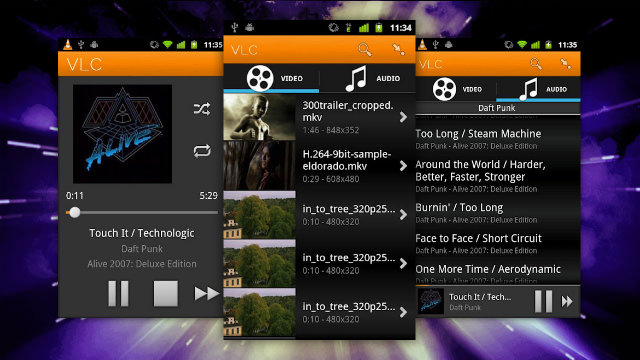
There is a good news for the Android users who were waiting for the release of do-it-all player for their devices. VLC Beta got released a week ago and is now available for free download from Google Play. Looks as if the VideoLAN team is busy with several things. Recently it updated the OS X desktop client to support the Retina display on the MacBook Pro, and now a beta version of VLC has landed in the Play Store.

The basic interface is surprisingly good, borrowing here and there from the stock Music app with the handy addition of a visible index bar. Search functions make it easy to find any song among thousands. You can view songs by album, artist, or genre and when a song is being played, you can view the album art, artist, and use play/pause and skip buttons at the bottom of the screen.


Just like its counterparts on Mac and Windows, VLC is a free, open source, supports just about any media file that you have stored on your Android based phone or tablet, and offers an audio and video media library with full search capabilities. It also provides subtitles and streaming options, including HLS (HTTP live streaming).

There are a lot of features which VideoLan team has planned to incorporate in the final player. Some of them such as auto-rotate, aspect ratio adjustment, controlling volume through gestures, support of home screen widget, support for headset controls, have already been included in the device.

Along with such features come various drawbacks, which the development team has mentioned as “It might kill your kitten, destroy your house and start the mayan apocalypse. Use it at your own risk. Have Fun!”. According to the team, VLC in android is unstable and slow, along with that performance improvements and a UI face-lift are also required. Still in its early build stage with a lot of unfinished elements, this particular version may not work on all hardware and is recommended for power users and hackers.


Although it won’t cause any damage to your Android device, don’t expect blistering performance or uninterrupted playback. Users may face some problems such as stuttery video and decoding artifacts, audio issues, glitchy running of videos and rough transitions.

One more major problem is that your hardware may not support this player.Although as of now it is designed for ARM v7 CPU and NEON hardware, and requires Android 2.1 or high it will support almost all devices in future.

Lot of work still needs to be done to make it compatible with all the hardware devices. This beta version is just to provide an intriguing taste of what a user can expect from the future releases. This is obviously a very early demo of what is going to come, but it’s definitely an app to keep an eye on. It’s nice to see VLC finally making the jump to Android, but there are a lot of video players already on the market with a wide range of hardware support such as BS Player, MX Player, and Dice Player.

Let us see if VLC will grab the go-to app status and will maintain its reputation of Swiss Army Knife media player, as everyone wants to ensure that he or she is able to playback almost any file format imaginable, and the mobile version will feature the same luxuries.

Monday, 16 July 2012

Create Your Own Smartphone App With Infinite Monkeys – No Coding Knowledge Required

It would be great if we all had the time, skills, and patience to learn computer coding, especially since technology pervades so many areas of our life. But thankfully, there are applications and web developers out there who provide ways for the rest of us to produce apps with little or no coding skills.

Back in June, I reviewed one such web application called Buzztouch, which is designed to allow anyone to create their own smartphone application. Now a similar program has just been released called Infinite Monkeys, a web-based tool geared toward niche communities who want to share content on the iPhone and Android platforms. Infinite Monkeys is not as polished theme wise as Buzztouch, but unlike the latter, Infinite Monkeys, says the developers, “Is completely web-based, and works on any computer or tablet device. You never touch the source code and don’t have to know what it is or how it works.” There are several other differences that also might make Infinite Monkey more accessible to non-programmers than Buzztouch. But you’re free to explore both and see which fits your needs.

Web-based GUI

Infinite Monkeys’ web-based graphic user interface allows users to incorporate existing web content from social networking sites like Twitter, Flickr, YouTube, and blogging sites.


These web-based apps of course don’t compare to more advanced apps like Angry Birds, but they are great for small niche communities and businesses, such as school associations, sports teams, churches, musicians and restaurants, who want to share content privately or publicly.

Infinite Monkeys provides three different app platform models, ranging from free to the pro level version of $499. But for many users, the free HTML 5 web-based, and ad-supported model should suffice.


Building An App

Infinite Monkey provides a seriously easy step-by-step process for creating a smartphone app in less than an hour; that is if you have an ample amount of content already posted on the web.


The great thing about using a web-based platform is that you can constantly add content and updates to your app via your blog site, YouTube channel, photo sharing site, etc.

The Infinite Monkey web application uses a familiar drag-and-drop process. You start off by giving your app a title, followed by choosing a privacy setting. You can make the app public, or private for closed community access which will prompt users to enter a password to view content.


You can of course customize the background image and splash screen, as well as the font colors for the title and other text.

Core Content

The core content of your app consists of primarily news and third-party feeds such as your blog site(s) and specific URLs.


Infinite Monkeys includes additional content models for music and books, food and beverages, events, sports, reference materials, and location services such as a map and directions.

With the click of a button you can easily preview your app at any point in the development process. The online app also includes an embedded short video tutorial for each of the three part steps and multifunction tools.

You have poor control over the content of your app, including links to streaming videos, live chatrooms, shared calendars for upcoming events, shopping links to recommended products, and tap–t0–call phone contact information.

Publishing App

The free version of Infinite Monkeys allows you to instantly post your HTML 5 version immediately to the web so that anyone with a web-enabled smartphone can access it through the assigned URL.


Since your app is ad-supported, Infinite Monkeys will host it for free on their server. While it is not nearly as polished as professional apps that you will find in say the iTunes App Store, it does provide a way for anyone to get their content into this space.

Monday, 25 June 2012

Speed Up Adobe Photoshop Loading

Adobe Photoshop is currently the best image editing  tools available with advanced features including filters and brushes. There are hundreds of brushers and filters available online for download and use. When you have installed too many filters or brushes, the loading time for Photoshop  increases considerably. Even though you might not be using certain plugins and filters, they are still loading when Photoshop is opened.
Adobe Photoshop SpeedUp significantly decreases the time it takes to load Adobe Photoshop by disabling the plug-ins that you may not need.

There are several options such as whether to load the Adobe Fonts, load the presets, and set the memory usage. You may restore to the original settings at any time.
Features;
  • Enable or disable the plug-ins as needed
  • Do not load Adobe fonts CMap and Base
  • Do not load Photoshop Presets
  • Optimize and reset Maximum Memory Usage
  • Restore to original settings with a click of the Restore button at any time
It populates the list of plugins and other options which can be disable and make photoshop load faster on start up.

Automatically Reply to SMS in Android

There might be many instances where you receive an SMS on your phone, but could not reply back as you were in a meeting or driving or even watching a movie. If you use an Android phone, Butler SMS is the solution. It is an auto SMS response application for Android 2.2+. It comes with a very convenient widget that resides on your home screen and you can instantly activate it so that it will reply to any SMS received. There is no need to run an application and it offers easy access to turn on and off the widget.

ButlerSMS now has 3 modes. Normal, Movie and Drive mode. When your phone is plugged in to a car dock, ButlerSMS will turn on automatically. The movie mode places your phone in to vibrate mode automatically.

There is also Voice Reply feature where in you can use this to reply to SMS messages using your voice. (TTS must be enabled). Apart from you can also blacklist phone numbers and phone numbers in this list will not receive a auto reply from ButlerSMS.

Complete list of Features:
  • Custom responses
  • Personalized responses to individual numbers you set
  • 3 different preset modes – Normal, driving and movie
  • Widget for home screen to toggle normal mode on/off
  • Text to Speech – Reads sms messages to you when enabled
  • Reply Timer – App will not reply until after a preset time has elapsed (after their first sms) that is user changeable
  • GPS Locator – This will respond to a user that sends a pass phrase that you control (pass phrase is set when gps locator is enabled and is cleared when it is disabled).
  • Voice response – If TTS is enabled, you can send a sms msg via voice. This will unlock your phone to allow you to safely reply to a sms msg. The screen will timeout after 20 seconds of inactivity (not touching the screen) or after you send a voice reply.
  • Improved TTS by controlling audio volume – When a SMS is received, the audio volume will be muted while your sms is read to you. The volume will raise when it is done reading.
  • Blacklisting – (Or whitelisting) Numbers in this list will not be replied to.
  • Re-organized the GUI on the settings page.
  • Voice Reply is now an option that can be turned off
The application is available in the Google Play store for $1, but you can download it free of cost from XDAhere.

Battery Optimizer for Windows

When it comes to a Windows Laptop, Battery life  is one of the most important aspects. Although manufacturers provide the expected battery life when you buy the laptop, you seldom get the desired results. This is because of the settings and usage patterns which vary from user to user. Battery Optimizer is a freeware app for Windows, which is an advanced laptop optimization utility that uses advanced diagnostics and testing to guide you to get better Battery life.


Unlike other free tools to improve battery, this app has advanced features which actually tells you how much extra Battery life you can save by turning certain hardware and services off on your laptop. You can then save those settings as a profile so that you can quickly and easily optimize your setting for your current usage at any time. The app has the diagnostic mode which will check your laptop battery.


The profile feature is pretty good and you can create multiple profiles and then switch between them when you want performance or battery life.

Features that Battery Optimizer offers that no one else does:
  1. Accurate estimates on how much battery life can be gained/lost by changing laptop settings
  2. Advanced monitoring of  battery usage over time
  3. Shows time left on your battery when your operating system doesn’t
  4. Easy battery usage management
Battery Optimizer is designed to fix a problem that plagues most people, short laptop battery life. It is a very good app if you are looking to get better battery life.

Friday, 22 June 2012

How to: Override your Windows password

Whether you have forgotten your own password, or you want to hack into another user account on Windows XP or Windows 7 PCs, here is a very easy trick or method, which does not require you to download any third-party utility or run complex commands. This is a very straightforward trick and the necessary requirements are already present with you. You may consider this method a security flaw in Windows, but there are ways that you can also block it before somebody else uses it to get into your PC.


However, if you do so, there are chances that you might not be able to use it yourself, if you get locked out of your own account. You might then need to use other resources (like Linux) to crack/reset your password. It is always advisable to enable the ‘Administrator’ account and set a password to it. In this way, you can get into the Administrator account and reset other user passwords.


Windows, be it Windows XP, Windows Vista or Windows 7, has a built-in feature called ‘Sticky Keys'. This is an accessibility feature that was implemented to help people with certain types of physical disabilities and also to help reduce the strain of repetitive keystrokes. It helps serializing keystrokes, instead of pressing multiple keys at the same time. You can find out more from the system’s control panel. In this article, we shall show you how to take advantage of this feature in Windows and turn it into a password hacking option.


Step 1
The trick involves replacing the Sticky Keys control panel with the command prompt and then triggering the password reset commands from within the command prompt window. However, doing this is not as easy as said. Since the Sticky Keys cannot be easily renamed when the PC is logged in, we have to do it from the recovery mode.


Step 2
In this workshop, Sticky Keys is not actually used to hack the password, but we shall make use of its features to pull up the command prompt in administrator mode and do the needful. We would need to pull up the command prompt before the PC is logged-in, in order to change the password. However, since the command prompt cannot be accessed during pre-login, the Sticky Keys option can be used here. Nevertheless, to get the necessary hack in place, we need to run a few commands. Let’s proceed ahead on how to do it.


Step 3
First, you need to boot your PC using your Windows installation DVD. Make sure you have your BIOS set to boot from the optical drive. Once you boot from the OS installation DVD, select the option to repair your computer. Windows will start loading the necessary files it needs and starts searching for problems that it can detect.


Step 4
Note: This will take a bit of time depending on your computer’s speed. After a while, you will be asked to choose the location of the installed Windows OS on your hard drive. Choose the appropriate one and click on the ‘Next’ button. After the recovery mode checks for options, it will then will pop-up a window asking if you want to restore your system to an earlier point using the System Restore option. Decline the offer and press the cancel button.

Step 5

The next screen will state that Startup Repair cannot repair your computer automatically and ask you to choose to send the information report to Microsoft. This time once again, decline the option and click on ‘Don’t send’. The next window will ask you once more what it should do now. Click on the link which reads ‘View advanced options for system recovery and support’. This link will take you to the options page where you should click on the ‘Command Prompt’ link. Once clicked, you will have the command prompt window where you should type the following commands as given below -


Step 6

Now that you have finished with the necessary requirements to run the command prompt using the Sticky Keys function during the login period, you can restart the PC and boot the computer normally without the DVD. After the PC has booted into Windows, you will land on the login page, where you need to enter the password for the user. Assuming you have forgotten the password and need to reset it, here is what you have to do. Hit the ‘Shift’ key five times. The Sticky Keys will sense the shift key being pressed five times and will try pop-up the Sticky Keys utility.

Step 7

However, since we have replaced the original Sticky Keys utility with the Command Prompt utility, you will see the Command Prompt window pop-up. This window will allow you to make any changes to the system using the default administrative privileges. Here, simply type the command to change the password of the user, which you have either forgotten or are trying to hack into. Type the command as follows:
Step 8
Once done, you can exit the command prompt window and login using the new password.
You can use this method to gain access to any user profile whenever you have forgotten the password. However, since it is a very simple method, you can run the risk of anyone gaining unauthorized access to your PC. If you feel this can cause a security issue or threat to your personal and important data, you can disable Sticky Keys permanently from the control panel. 
Step 9

Note:
This workshop highlights a method of gaining access to a Windows PC and is for knowledge purposes. We urge you not to use this for any illegal purposes. Use this method at your own risk.

How to - run Android apps on your PC


Apps on popular mobile platforms such as Android, iOS and Windows Mobile are functional, compact and sometimes, very beautifully designed. 


Most of the Apps on popular mobile platforms such as Android, iOS and Windows Mobile are functional, compact and sometimes, very beautifully designed. Most of the features and information you get from them could practically be used on the desktop. Unfortunately, they aren’t available for the desktop so you’ll find yourself lifting your phone to check out the latest tweets or maybe play a game of Cut the Rope.

What if you could do all of these things on your desktop itself. You can using a remote desktop application installed on your phone or tablet. It’s more complicated and it requires you to use the resources of your devices. There’s a simpler way to run these apps directly off your PC and we’re going to show you how  dojust that.

Introducing Bluestacks
Bluestacks is that magical software that’ll let you run Android apps on your PC. Now, Bluestacks supports Windows, which means you could technically run Android apps on your desktop, notebook or even a Windows tablet. Bluestacks is a virtualization software that allows Android apps to work on a layer above Windows. Remember that some of the apps on Android require some acceleration through graphics hardware. If you’re using an old netbook or PC, some of these apps may not function or may not perform very well.

Download and install Bluestacks

The home screen and the Android environment running


Head over to the Bluestacks site and download the application. There are two versions available for download - one an online installer that’ll download data from the web as it installs and the other, an offline installer that is bulkier. It’s just under 100MB and it should take no more than 15 minutes on a moderately quick connection. Installing the application should take no more than a minute or two.

Configure BlueStacks settings
Once the installation is complete, Bluestacks will load into a window with a large text entry bar and a few icons at the top. On the bottom right, you’ll find a Settings icon. You can use the mouse to click on the menus or use the directional keys on the keyboard. Pressing the Enter key enters a menu and pressing Escape will take you back one step in the menu. There’s even a menu button on the left bottom of the screen and a home button at the centre. You can use your mouse to perform all kinds of gestures as well. Set up your keyboard layout and language settings.

 Searching and installing apps


The Android store with all the apps in it

Now that you have BlueStacks running Android on your PC, the next obvious step is to install apps on it. Bluestacks has three app stores that come bundled with it, so all the apps you search for will be looked for, in these. GetJar, Amazon App store as well as the official Google app store are present. You can browse the apps manually as well.


List of installed apps, accessible via the dock

Screenshots are also available, as are the app recommendations. Choose the apps you want and install them by clicking on the Download link. You can then start the app by clicking on it using the My Apps icon in the dock hovering at the top of the screen.

Run apps in a larger view
 
Selecting the size and layout of apps on screen

Bluestacks gives you the option to run applications in a tablet-like view or a mobile phone. To change the layout of the app you’re using, click on the Settings button and click on Manage App size. Here, you can choose the size that you want to run the app in. Click on Done to save the settings. Bluestacks will restart to make the settings active.

The Android Pulse app in action

So, that’s how you can get your favorite Android apps to run on Windows. If you don’t have an Android device, this is your chance to get a look and feel of the apps on the popular platform. However, if you already use an Android device, you can check out the Cloud connect feature to get all the apps from your phone to your desktop.